When people say Dota 2 ward hack, they normally mean a feature that can display enemy ward information on screen. Melonity calls it Ward Tracker. Another module, Ward Helper, points out recommended spots for wards you plant yourself.
When enemies keep slipping away just before your rotation lands, a map marker beats guessing one more time where they have vision. Still, markers, radii and visibility warnings each tell you something else. Below is what every one of them puts on your screen.
Quick answer: the location says where a ward was registered; the radius display shows how far it reaches on screen; the timer brings in time; a visibility warning is about your own hero. These pieces of information complement each other, yet one cannot stand in for another.
The two Melonity panels, up close
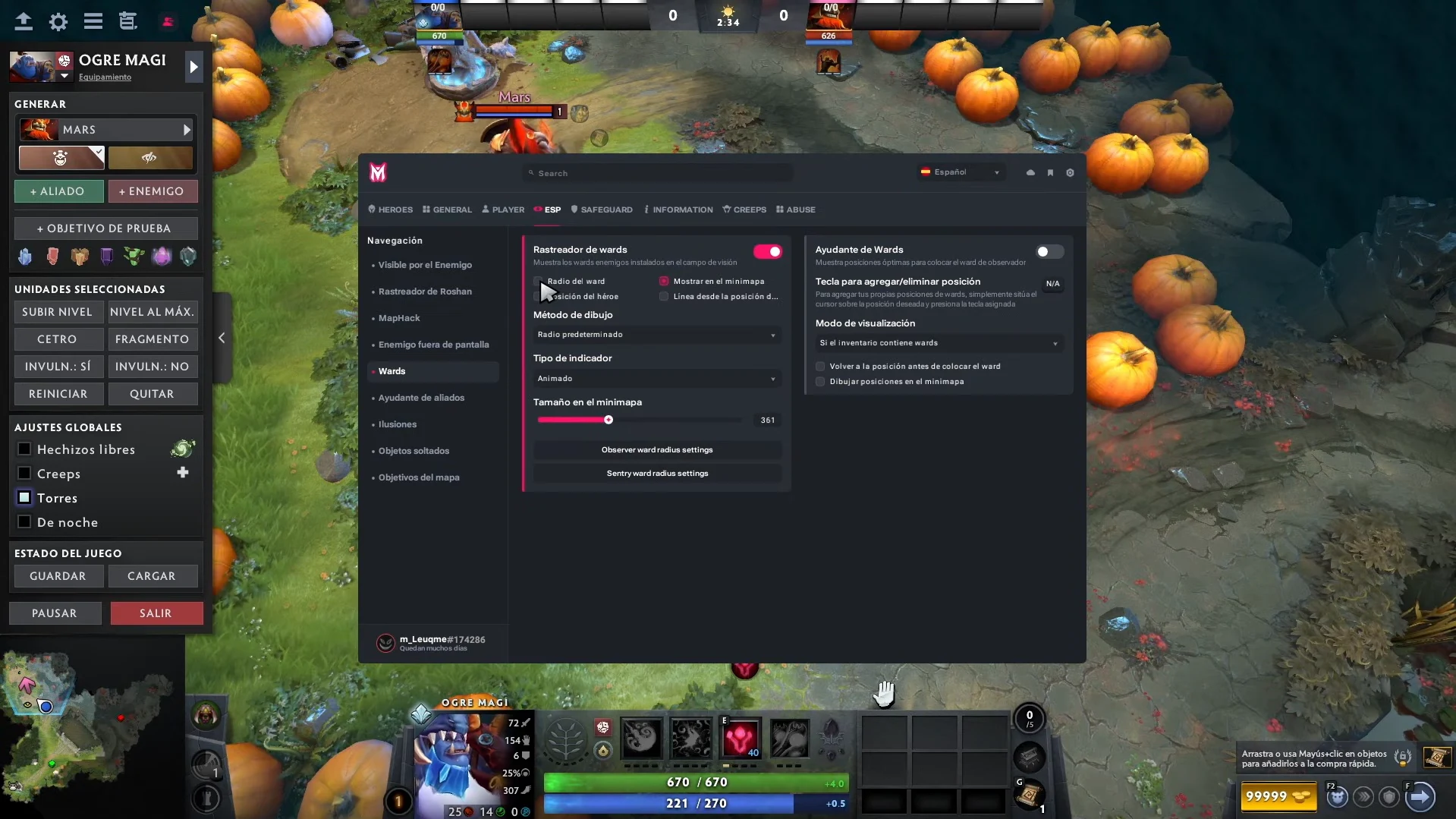
In the screenshot below you see the Wards section of the interface in Spanish. The panel shown first, on the left side, is Ward Tracker; its neighbor is Ward Helper.
On the tracker side there are settings for ward radius, displaying wards on the minimap, the indicator display style and the minimap size. Radius settings for Observer and Sentry are split as well. The helper side deals with recommended placement spots and the way they appear.
So each half has an obvious role. The tracker displays ward information. The helper is about a spot where you could put a ward yourself.
The fine print holds one more handy detail. According to this screenshot, the feature covers enemy wards planted inside your field of view. Melonity’s live site words it more broadly, as displaying enemy wards. So the screenshot is good for explaining the interface, but it cannot tell you how today’s build treats wards that have not been seen.
Is there a timer in a ward tracker?
Picture a ward marker popping up close to a path your team plans to take. Two distinct questions come up:
- Where is the ward? This is the location information.
- For how long does that information stay useful? To answer that, you must know what the time readout counts and if the ward is still standing.
Time left until a ward expires and time since someone spotted it are two different measurements. Before you trust any number next to an icon, find out which one you are looking at. The menu in the picture confirms radius and display settings; a timer for ward expiry is not in it.
When deciding what to buy, weigh what locations it covers apart from whether it supports timers. A product can give you solid ward markers and still lack some types of timers.
A range circle tells you something else
A marker only marks a spot. A range circle puts that point into space around it.
Say your team is choosing between two ways into one area. Just knowing a ward sits somewhere close tells you less than seeing on screen how far its displayed radius extends across each path. The overlay makes a tiny object far quicker to read.
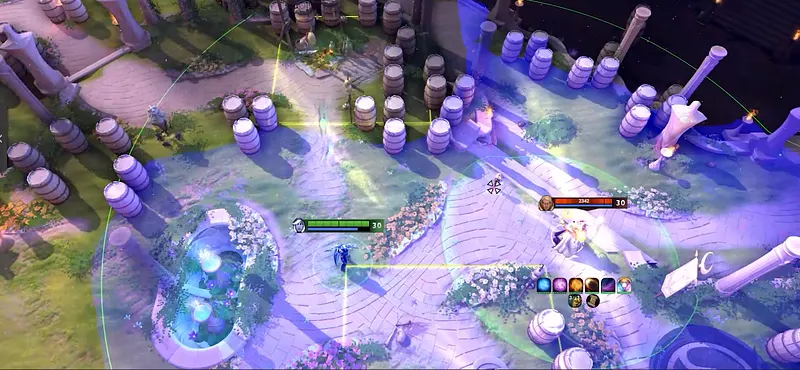
Always read the circle together with its label. A ward’s radius, a spell’s radius and a warning ring around your hero may all look round. Their shape gives no clue as to which question each of them answers.
“Visible by Enemy” does not point to a ward
Visible by Enemy, usually called VBE for short, is about whether anyone sees your hero. You can read about it in our Melonity overview.
A warning about your hero does not by itself name where the vision comes from. A ward marker may hint at an explanation, yet “someone can see me” and “that exact ward can see me” are not the same claim.
Support players in particular read on-screen information more easily once those claims are kept apart. One layer is about you. The other is information about something placed on the map. Connecting the two to what is happening is still your job.
Picking Melonity for ward information
In Melonity, Ward Tracker comes inside a broader bundle alongside hero scripts and map information. It fits anyone wanting enemy ward information displayed next to the rest of their toolkit instead of a standalone timer running in a separate window. Its dedicated display settings also give you a sense of how much the interface actually shows.
Before you pay for a subscription, look at three points: how well it covers enemy wards, how readable it is on the minimap, plus whether placement tips matter to you too. These questions tell you far more than the feature count on a sales page.
New accounts may be eligible for a trial; the account flow shows the current terms and who qualifies. Melonity runs on Windows 10 and 11, but not on Insider Preview builds. The protection modules it advertises belong to how the product markets its security, not to any pledge that the ban risk is zero.
check Melonity trial access when ward tracking is the feature you want. To learn about the other visual modules, see our Dota 2 maphack guide.
FAQ
What info will a Dota 2 ward hack give me?
A Dota 2 ward hack can display ward information on screen: where wards were registered, markers on the minimap, range overlays. What it covers varies by product; in Melonity the feature goes by Ward Tracker.
Are a ward tracker and a ward timer one and the same?
No. The tracker deals with ward information, the timer deals with expiry or elapsed time. Some products merge the two, but the word “timer” says nothing about how locations get collected.
Is Ward Tracker part of Melonity?
Yes. Melonity lists it on its product page today, and the published interface sample shows a tracker panel of its own.
What is Ward Helper for in the menu shown?
This panel covers recommended spots for placing an Observer Ward and the settings for how those spots are displayed.
If VBE fires, does that mean an enemy ward is close?
No. VBE is about whether your hero can be seen. On its own, the warning cannot tell you which object or enemy provided the vision.
Found an outdated claim or broken source? Send a correction request.